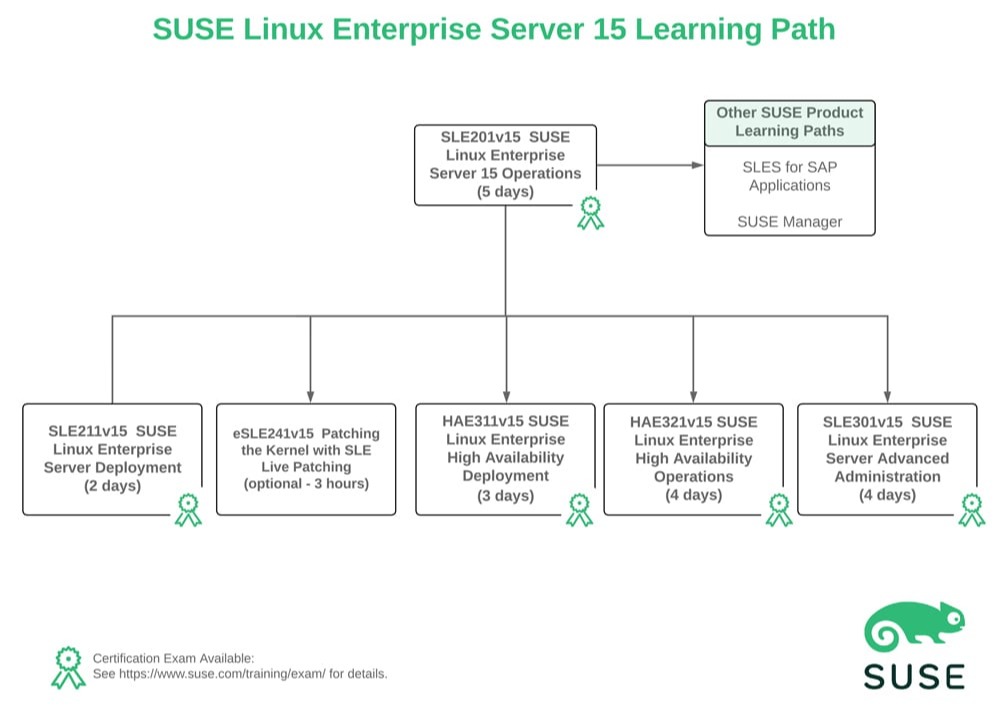
Attendees will be taught the following concepts and skills that are fundamental in administering the SLES Operating System:
• The command line interface & commonly used commands
• The file system structure and file types
• Management of local users and permission management
• Process management and scheduling of tasks
• Remote administration configuration and use
• Storage management
• Btrfs file system configuration and use
• Basic networking configuration
• Software management
• Available log files
LINUX COURSE OUTLINE
Section 1: Course Introduction
• Course Objectives and Audience
• Course Lab Environment Overview
• Certification Options
• Additional SUSE Training
Section 2: Overview of SUSE Linux Enterprise
• Introduction to SUSE Linux Enterprise
• SUSE Linux Enterprise Subscription
• SLES Documentation
Section 3: The Command Line
• Overview of the Bash Shell
• Get Help in the Bash Shell
• Commonly Used Commands
• Stream Redirection and Piping
• Search the File System for Files and for Text Within Files
Section 4: The Linux File System
• Introduction to the File System Hierarchy Standard
• The Linux File System Structure
• Linux File Types
Section 5: Text Editors
• Introduction to Vim
• Basic Vim Configuration
• Enhanced Vim Features
Section 6: Users and Groups
• Overview of Linux Users and Groups
• Manage Users and Groups from the Command Line
• Manage Users and Groups using YaST
Section 7: File and Directory Permissions
• File System Permissions
• Special File and Directory Modes
• Extended Access Control Lists
Section 8: Process Management
• Introduction to Linux Processes
• View Processes
• Introduction to Signals and Process Termination
• Process Priority
• Foreground and Background Processes
Section 9: System and Service Management
• Introduction to systemd
• Manage Services with systemd
• Configure systemd Targets
Section 10: Task Scheduling
• Introduction to Task Scheduling
• Schedule Recurring Jobs
• Schedule One Time Jobs
• Schedule Jobs Using Systemd Timers
Section 11: Privilege Delegation
• Effective User and Group Identifier
• Modifying User and Group Identifier
• Manage Privilege Escalation Using Sudo
Section 12: Remote Administration
• Overview of Remote Administration
• Remote Administration Using SSH
• Configure Key Based Authentication for SSH
• Remote Administration Using VNC
• Remote Administration Using RDP
Section 13: Storage Management Fundamentals
• Overview of Linux Storage
• Disk Partitioning
• Linux File Systems
• Mount Volumes into the Linux File System Hierarchy
• Storage Management with YaST
• Manage Storage Space
Section 14: Logical Volume Manager
• An Overview of Logical Volume Manager
• LVM Configuration File and Services
• LVM Configuration from the Command Line
• Managing LVM from the Command Line
• LVM Snapshots
• LVM Configuration Using YaST
Section 15: Btrfs Management
• Overview of Btrfs
• Creating and Managing Btrfs File Systems from the Command Line
• Managing Btrfs Using YaST
• Introduction to Btrfs Snapshots
Section 16: Network Management Fundamentals
• Overview of Network Interfaces
• Physical Network Interface Naming
• Managing Network Configuration
• Test Network Configuration
• Network Management Using Wicked
• Name Resolution
• Network Management Using YaST
Section 17: Software Management
• Overview of Software Management
• Introduction to RPM
• Working With RPM
• Introduction to Zypper
• Zypper Repository Management
• Zypper Package Management
• Using YaST to Manage Software
Section 18: System Logging
• Overview of System Logging in SLES
• Kernel Log Messages
• The System Logging Daemon
• Log Rotation
• Systemd Logging
• Supportconfig